
skip to content
jotdownload
macOSnew in 1.1.4

select. shift shift. it's a jot.

a local-first notes inbox for your mac. one keystroke, and it lands as plain markdown in a folder you own.

3 days free · $9 launch · macos · 7-day refund · launch price for the first 50.

docs · planning notes

notes from the planning sync, thursday.

ship the onboarding checklist before friday's review.

design review moved to the afternoon slot.

we keep the scope as discussed.

double-tap to capture
JotInboxArchive
Search jots
⌘K
  • Call the bank about the card13 min ago · errand
  • Buy oat milkyesterday

A new jot

Inbox

2 open

try it right here. select any line on this page, then tap shift twice. on a phone? tap the key twice.

intro

catch it. keep the file.

a short look: capture, dictation, annotate, agents.

for mac

download jot.

version 1.1.4. open the dmg and drag Jot.app into Applications. intel and apple silicon, macOS 12 or later.

download for macor get Jot.app as a zip

a license is separate from the download. 1 Mac is $9 launch ($29). 3 Macs $24 ($87). 10 Macs $69 ($290). pricing

MacBase members can enter MACBASE10 at checkout for 10% off.

install notes

  • intel and apple silicon, macOS 12 or later
  • drag Jot.app into Applications
  • every feature free for 3 days

why jot

  • 01

    one keystroke

    shift shift takes the selection. text, an image in it, or a screenshot already on the clipboard.

  • 02

    a folder you own

    every jot is plain markdown on this mac. no account, no sync. analytics stay off unless you turn them on.

  • 03

    pay once

    a license for 1, 3, or 10 macs. updates included. nothing renews.

the app

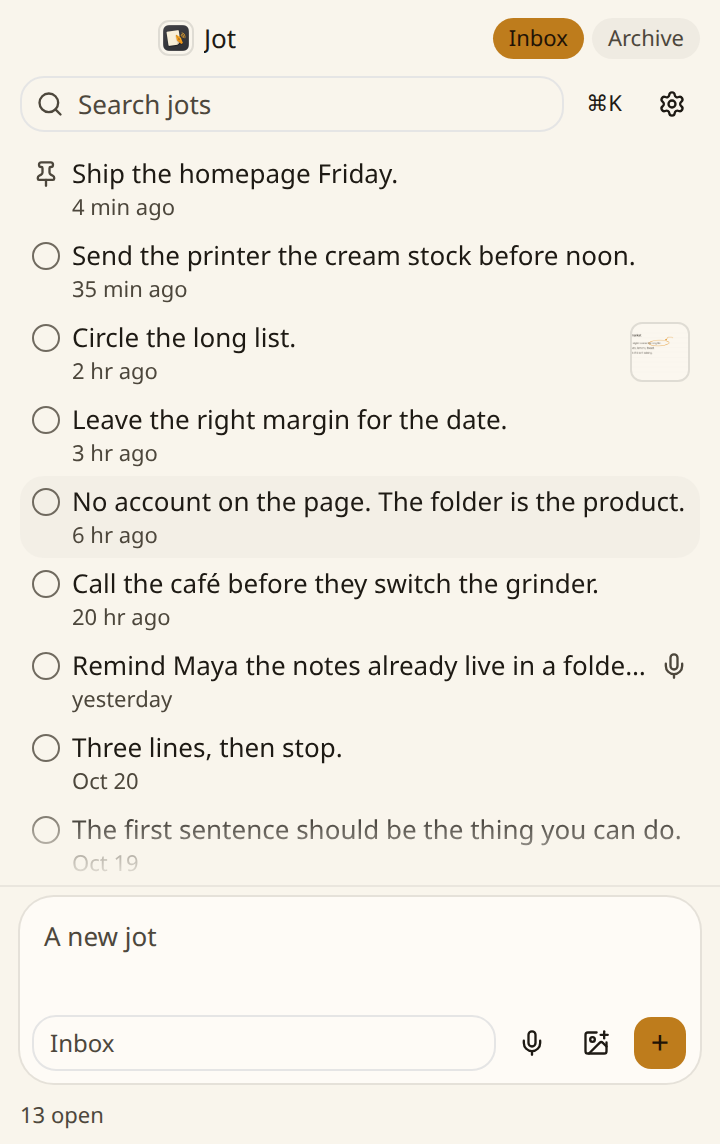
everything lands in one quiet inbox.

the inbox

shift shift captures the selection. text, images in it, or a screenshot already on the clipboard.

The Jot inbox on the paper theme, filled with notes, including a pinned note, an annotated image, and a dictation.

hold fn

speak, and the text pastes into the app in front. keep dictations on, and a copy is a jot. cleanup is optional. fillers and false starts come out. the wording stays. one switch turns cleanup off. ⌃⌥V speaks a jot. hold to talk.

⌃⌥A

grab a region of the screen. mark it up, then copy it to paste anywhere, or save it to the inbox. ⌃⌥D draws a page and saves it as a jot.

⌃⌥N

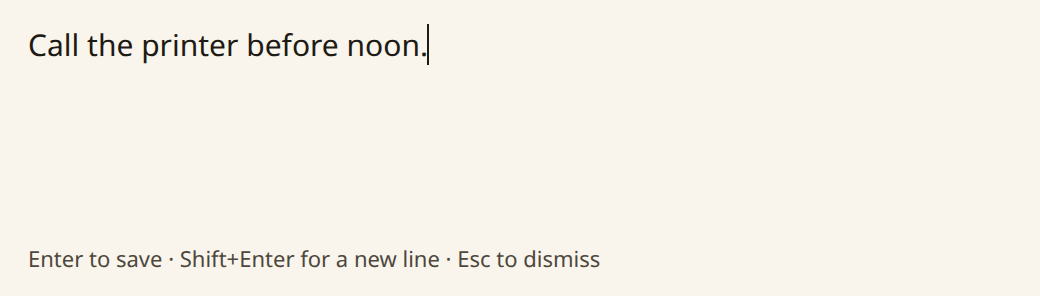
Quick note, the capture window, with the line Call the printer before noon.

quick note writes one without opening the window. ⌃⌥N.

on this mac, or a cloud model

transcription and cleanup are separate choices.

Parakeet · Appleon this mac
a cloud modelonly if you pick it

on this mac: parakeet, apple speech (macOS 26+), apple intelligence (apple silicon, macOS 26+), ollama, or lm studio. in the cloud: your own key for openai, anthropic, gemini, groq, mistral, openrouter, and more, or vercel ai gateway. keys stay in the macos keychain. every model shows its price and speed.

send to your agent

right-click a jot. send it to your agent.

claude code, codex, cursor, and t3 code open a new chat with the jot in the message box. nothing is sent until you press send. ⌘⇧S sends to the app you used last.

new chat

  • Claude Code
  • Codex
  • Cursor
  • T3 Code

copy, then open

  • Antigravity
  • Windsurf
  • VS Code
  • Zed
  • Kiro

jot mcp

claude mcp add --scope user jot -- /usr/local/bin/jot mcp

an mcp server. your agent can list, search, read, add, finish, archive, and tag jots. there is no delete tool. settings copies the config for other clients.

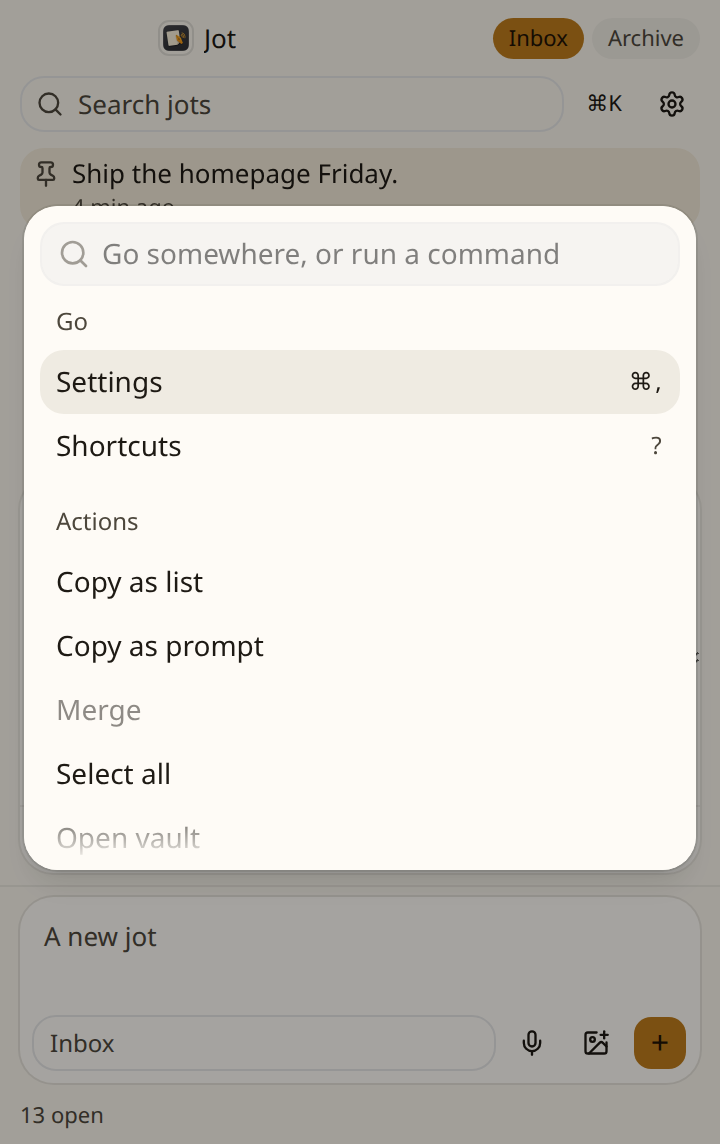
the inbox is keyboard-first. ⌘K — the command palette, with merge and send to.

  • ⌘Nnew
  • ⌘Fsearch
  • ⌘Kpalette
  • Earchive
  • ⌘⌫delete
  • ⌘Zundo
  • J / Kmove

see it work

the real app, start to file.

capture, dictation, annotate, ⌘K, and send to your agent. the real app, with demo notes.

a folder you own

every jot is a plain markdown file.

  • no account.
  • no sync.
  • analytics are opt-in.

no account. no sync. analytics are opt-in. cards show the markdown formatted, and the file stays plain text, so agents and other tools can read it. drop an image onto a jot. merge selected jots from the command palette.

~/Documents/Jot
  • INDEX.md
---
id: k3f
source: Safari
tags: [work]
created: 2026-10-26T09:41
---

ship the onboarding checklist before friday's review.

who it's for

made for students, writers, meetings, developers, research, more than one mac

the same inbox. the work in front of you changes.

  • students

    a line from the reading, or a slide.

  • writers

    a sentence, while another app is in front.

  • meetings

    speak the line afterward. it can stay a jot.

  • developers

    an error, a path, a command. send it to claude code or codex.

  • research

    a passage. a browser capture can keep the page address.

  • more than one mac

    the same key, on as many macs as the license allows.

ways in

your hands never leave the keys.

⇧⇧

the selection, or a screenshot on the clipboard

hover the dock. click a key to see what it does.

pricing

pay once. pick the macs.

no subscription. try every feature free for 3 days. the features match on every license. launch price for the first 50.

1 Mac

the mac you write on.

$9regular price $2969% off

launch price · one-time

  • shift shift, voice, annotate, draw, and send to agents
  • updates included
  • plain markdown in a folder you own
  • move a seat to another mac yourself
  • 7-day refund, no questions asked

FIRST50 applied at checkout

buy for 1 mac

10 Macs

a studio or a small group.

$69regular price $29076% off

launch price · one-time · $6.90 a Mac

  • shift shift, voice, annotate, draw, and send to agents
  • updates included
  • plain markdown in a folder you own
  • move a seat to another mac yourself
  • 7-day refund, no questions asked

Prices in USD. Dodo runs checkout. 7-day refund, no questions asked.

upgrading to more macs? buy the bigger plan and email support@sayjot.xyz within 30 days. we refund what you paid for the smaller one.

MacBase members can enter MACBASE10 at checkout for 10% off.

questions

good to know before you buy

a person reads every message at support@sayjot.xyz.

try every feature free for 3 days. then pick 1, 3, or 10 macs and pay once.

see pricing

Using Jot

yes. jot is a macos app for intel and apple silicon macs with macos 12 or newer. apple speech needs macos 26 or later. apple intelligence cleanup needs apple silicon and macos 26. parakeet works on both, slower on intel.

select text and press shift shift. images in the selection come too, and so does a screenshot already on the clipboard. quick note is ⌃⌥N, without opening the window. hold fn to dictate into the app in front. ⌃⌥V speaks a jot. ⌃⌥A annotates a region. ⌃⌥D draws a page into the inbox.

yes. settings remaps them. clear a chord and it stays off.

yes. right-click a jot, then send to. claude code, codex, cursor, and t3 code open a new chat with the jot in the message box. nothing is sent until you press send. antigravity, windsurf, vs code, zed, and kiro have no link for a new chat, so jot copies the prompt and opens the app. only apps on this mac are listed. ⌘⇧S sends to the app you used last.

yes. jot works fully for 3 days from the first time you open it. then it asks for a license. buy one, then paste the key in settings, then license.

a 1-mac license is active on one mac. settings, then license, then deactivate frees that seat so the next mac can take it. a 3-mac license can be active on three macs at once, and a 10-mac license on ten. deactivate frees one seat. every tier has the same features.

Your Mac and your data

every jot is a markdown file at ~/Documents/Jot/, named YYYY-MM-DD-id.md. a mac you update keeps the folder it already uses. no account. no sync. analytics stay off unless you turn them on.

only what that feature needs.

  • accessibility. jot captures a selection, and pastes dictated text into the app in front.
  • input monitoring. the fn hold works while another app is in front.
  • microphone. jot hears you dictate.
  • screen recording. optional. jot captures the screen when you annotate, and macos asks the first time.

yes. settings, then voice & ai. pick who transcribes and who cleans up: openai, anthropic, google gemini, groq, mistral, openrouter, deepgram, elevenlabs, azure openai, aws bedrock, cloudflare workers ai, xai, and more. vercel ai gateway or any openai-compatible server works too. each key is stored in the macos keychain. if a cloud step fails, jot falls back to parakeet and apple intelligence (apple silicon, macos 26+).

jot checks dl.sayjot.xyz for updates. parakeet downloads its speech model from hugging face once. apple speech can download a language pack from apple. on-device choices stay on the machine: parakeet, apple speech, apple intelligence, ollama, and lm studio. if you pick a cloud provider, jot sends the audio to transcribe, or the text to clean up, to that provider, or through vercel ai gateway if that is your pick. opening a model list can fetch it from the provider. each key stays in the macos keychain, not in the settings file. analytics stay off unless you turn them on.

yes. they are plain files, so an agent can read the folder. the jot command line tool ships inside jot.app and works while the window is closed. settings can link it into /usr/local/bin. jot mcp runs an mcp server, so claude code, codex, cursor, and t3 code can list, search, read, add, finish, archive, and tag jots. it has no delete tool.

Buying

no. one payment, then nothing renews. 1 mac is $9 at launch and $29 after. 3 macs are $24, then $87. 10 macs are $69, then $290. the features match. 7-day refund, no questions asked.

the tier you buy. 1, 3, or 10 macs can be activated at the same time. it is not a shared sign-in. each mac activates with the key.

the lower price is the launch price for the first 50. the crossed-out number is the regular price. for the 1 mac license, FIRST50 is applied at checkout.

the key is in the checkout email, and on the thank-you page. if you still cannot find it, write to support@sayjot.xyz.

7 days, no questions asked. email support@sayjot.xyz and a person reads it.

yes. buy the bigger plan, then email support@sayjot.xyz within 30 days with both order ids. we refund what you paid for the smaller one.

ready when you are

the next line can live in a file you own.

try every feature free for 3 days. then pick 1, 3, or 10 macs and pay once.